Easy access to information on more than one million parts
Do you want to stay on top of your repair and maintenance costs? Use the same tool that Caterpillar and Cat? Dealers use: Cat ET Service Information System (SIS). SIS is available by subscription via the Web, Network or DVD. CAT SIS covers every Cat product from 1977 through today. With SIS, you get access to 1.5 million part numbers, 2 million graphics and thousands of parts and service documents.
Using SIS provides fast searches, keeps you up-to-date with the latest information, eliminates outdated information in print and makes it easier to order parts, even after normal business hours. Make Cat SIS your single safe source for Cat parts and service information. Call your local Cat dealer for more on Web, Network and DVD subscriptions.
Cat Service Information System (SIS)
Improve Efficiency, Minimize Downtime
* Interactive Schematics
* 2D Hotpointed Graphics
* Streamline repair and maintenance operations with troubleshooting,
diagnostic and safety information
* Find exactly what you need with fast, efficient keyword searches
* Get the latest information with automatic updating
* View three decades worth of information on every Cat product
* Eliminate lost, missing and out-of-date paper manuals
* Take information into the field with a DVD subscription
* Rely on one safe source for parts and service information
Heavy Duty Truck diagnostic Scanner Cat SIS DVD recommended system requirements:
* 2.0 GHz Pentium-compatible processor
* 2GB of RAM
* 9-16+ GB of Free Hard Drive Space available through 2011 to allow for growth in graphics
* Optional file transfer device (such as a 3.5” disk drive or USB port and compatible Jump-drive)
* Third generation DVD drive capable of reading dual layer DVDs
* Monitor capability of supporting 1024 x 768 resolution and Open GL supported Graphics Card (Recommend 128MB+ RAM)
* Pointing device, built-in or external
* Hewlett Packard LaserJet V or compatible printer
* Microsoft Windows (XP, Vista and Windows 7)
* Microsoft Internet Explorer version 7.0 or 8.0 (must support Java Script and
Cat Dealers define worldclass product support. www.cnautotool.com offer you the right parts and service solutions, when and where you need them. The Cat dealer network of highly trained experts keeps your entire fleet up and running to maximize your equipment investment.

cnobd2tool 發表在 痞客邦 留言(0) 人氣()


What is OBDSTAR X300DP PLUS Configuration A, B, C?
8-0
It’s a new OBDSTAR OBD2 tool built with Android-based, used for vehicle diagnosis, coding, programming (key programming and ecu programming) and special functions (incl. odometer correction). It inherits from OBDSTAR advanced diagnosing technology and it is characterized by covering wide range of vehicles, featuring powerful function, and providing precise result. Through vehicle diagnostic OBD connector and variant mobile intelligent terminals, it achieves vehicle trouble diagnosis for full car model and full system vehicle.
There are three versions of Obdstar X300 DP Plus:
Configuration A, B and C coming with different features/function.
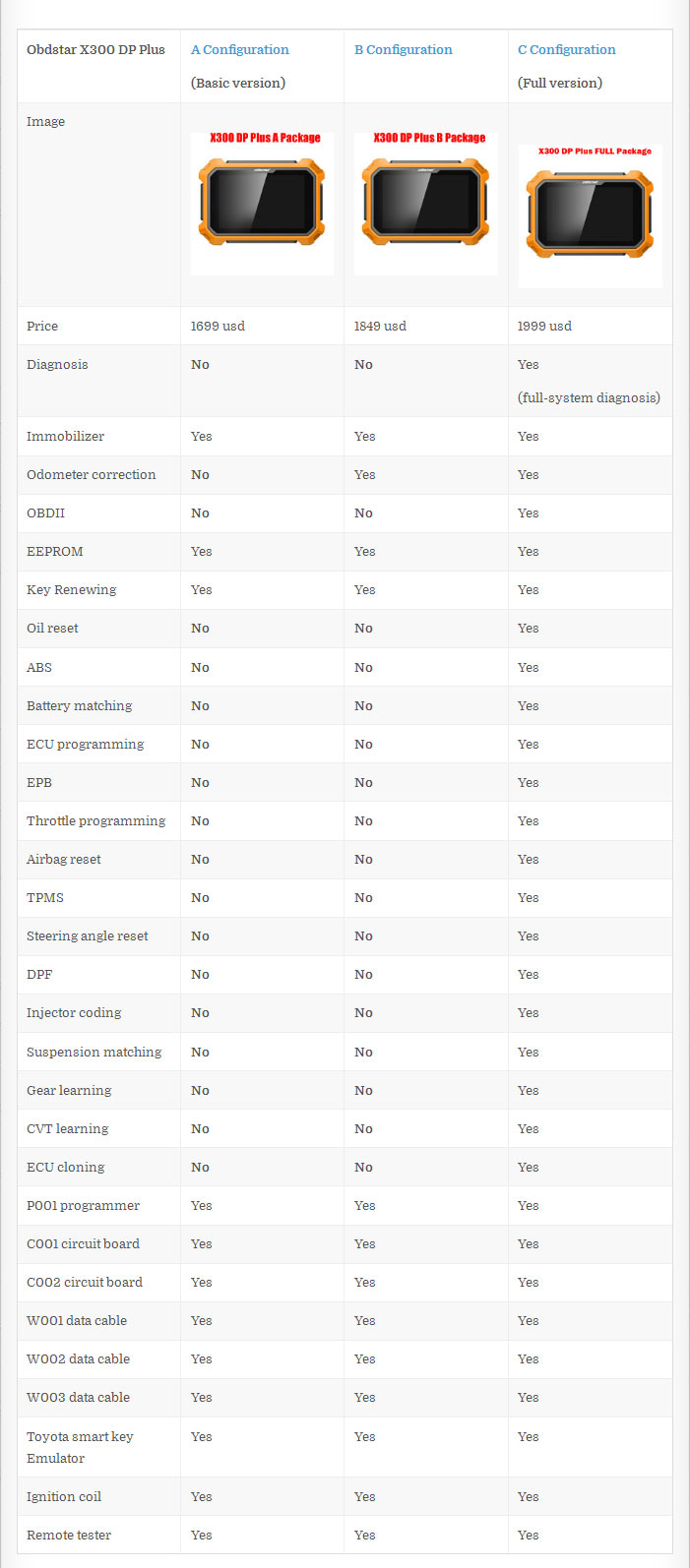
Look at the chart below in detail…
Obdstar X300 DP Plus Configuration A vs Configuration B vs Configuration C
8-1
X300 DP Plus A Package – used as a universal key programmer for locksmiths
Immobilizer+Special function(EEPROM+Key Renewing)Adapter(P001 programmer+C001circuit board+C002 circuit board+W001 cable+W002 data cable+W003 data cable+Toyota smart key Emulator)+others(Ignition coil+Remote tester)
X300 PAD2 B Package – works as an auto key programmer and a odometer correction tool
Immobilizer+Special function(EEPROM+Key Renewing)+Mileage correction+Adapter(P001 programmer+C001 circuit board+C002  circuit board+W001 data cable+W002 data cable+W003 data cable+Toyota smart key Emulator)+others(Ignition coil+Remote tester)
X300 DP Plus C Package – is a 3-in-1 tool for auto repair shops (auto diagnostic tool + car key programmer + programming tool for special functions)
Immobilizer+Mileage correction+Diagnosis+Special function (Oil reset +ABS+Battery matching+ECU programming+EPB+Throttle programming+Airbag rest+TPMS+Steering angle reset+OBDII+DPF+Injector code+Suspension matching+Gear learning+CVT learning+EEPROM+Key renewing+ECU cloning)Adapter(P001 programmer+C001 circuit board+C002 circuit board+W001 data cable+W002 data cable+W003 data cable+Toyota smart key Emulator)+others(Ignition coil+Remote tester)
IMPORTANT: OBDSTAR X300 DP Plus Immobilizer Car List
European cars:
VW/Audi/Skoda/Seat: Configuration C is able to program new keys to NEC 24C64 2014- (Configuration A is NOT able to…)
BMW: Configuration C is able to program FEM/BDC keys and read ISN codes (Configuration A is NOT able to…)
VOLVO: All X300 DP Plus versions CAN program/add new keys to Volvo
Also, X300 DP Plus A, B, C versions supports other cars made in Europe but not mention here…
Asian cars:
Hyundai/Kia: Configuration C is able to read pin codes of 47/8A/46 smart keys (Configuration A is NOT able to…)
Toyota/Lexus: The middle western version is able to program a new key with a H chip when all keys are lost (with the immo box reset)
Also, X300 DP Plus A, B, C versions supports other cars made in Asia but not mention here…
American cars:
Ford: Configuration C is able to program new keys to post-2015 Ford such as Mondeo, Edge, Taurus, ESCORT, Everest, Explorer, Raptor F-150, Raptor F-250, Mustang, Lincoln MKZ, MKC, Continental 2015 – etc. (Configuration A is NOT able to…)
GM: Configuration C is able to read BCM password of Buick LaCrosse (pre-2017), Envision, Trax, GL8, Malibu, Chevrolet Aveo, Excelle (pre-2015), Cruze, etc.  (Configuration A is NOT able to…)
Also, X300 DP Plus A, B, C versions supports other cars made in America but not mention here…
YOU HAVE TO KNOW: Why you should have a new Obdstar X300DP Plus instead of the old X300 DP and Lonsdor K518ISE?
Obdstar X300DP Plus vs OBDSTAR X300 DP:
X300 DP Plus has been improved a lot in hardware and supports more functions especially Toyota smart key card program and 8-pin chip data read.
In detail..
Obdstar X300DP Plus vs Lonsdor K518ISE:
Lonsdor k518ise is a tool for key programming only! It’s for locksmiths.
Obdstar x300 dp plus is a tool with diagnosis, immo and special functions 3 in 1. it’s a good helper to auto repair shops.

cnobd2tool 發表在 痞客邦 留言(0) 人氣()

15-1
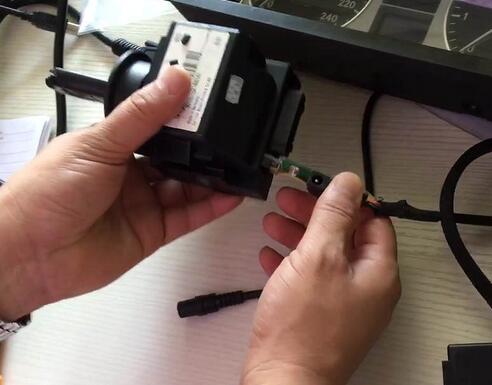
Today Leo showed us how to use OBDSTAR X300DP Plus to program mileage on Benz W169, please note, what he used is a testing kit, in the real test, you need only use the OBDII cable to connect the machine and the OBD port of the Benz instead of dismantle the dashboard.
Connection.

cnobd2tool 發表在 痞客邦 留言(0) 人氣()


Lonsdor K518ISE Key Programmer Program Volvo S40 common and smart key use manual:
1.    Add key
Common key: add one piece
Smart key: Add one piece
2.    Delete key
Key: delete the programmed key. Before deleting the key, please firstly select “Identify key ID” and record the ID info, during this process “The selected key ID will be deleted”.
Smart key: Delete all smart keys. If the key available is deleted, you could program it again.
3.    Identify key ID
Key: the ID of key available can be identified, please record data.
4.    Key unlock:
Key: Lonsdor K518ISE can detect and identify if the key is locked or not, if locked, K518ISE will unlock it. Note: K518ISE can unlock the key to the original car or the key with CEM security data.
Smart key: Lonsdor K518ISE can detect and identify if the key is locked, if yes it will unlock it. Note: only unlock the key of your car or corresponding cars’ key with CEM safe data.
As for “How to indentify smart and semi-smart key”, go for the last part.
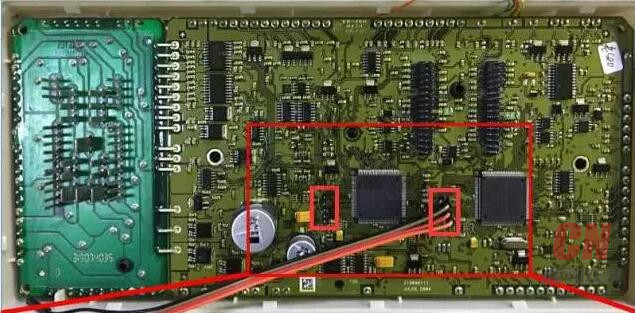
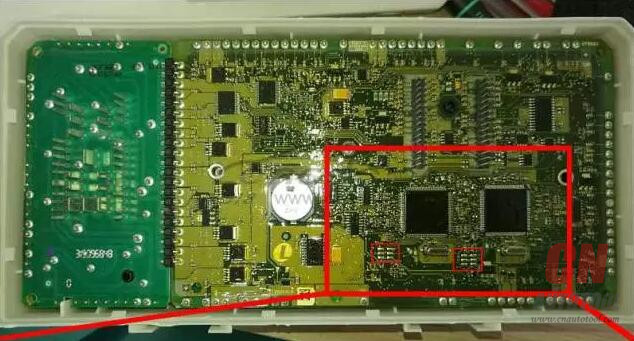
1). Please dismantle the CEM (located in front of the passenger seat and the back of the storage box). There are 2 kinds of boxes, and the wiring is different, please follow the below diagram to wire and use K518ISE to read out 2 copies of data from left to right.
The wiring diagram of style-A box
21-1 21-2
The wiring diagram of style-B box ( double 1L15Y wiring diagram, the wiring position on the left is the same as that on the right)
21-3
21-4
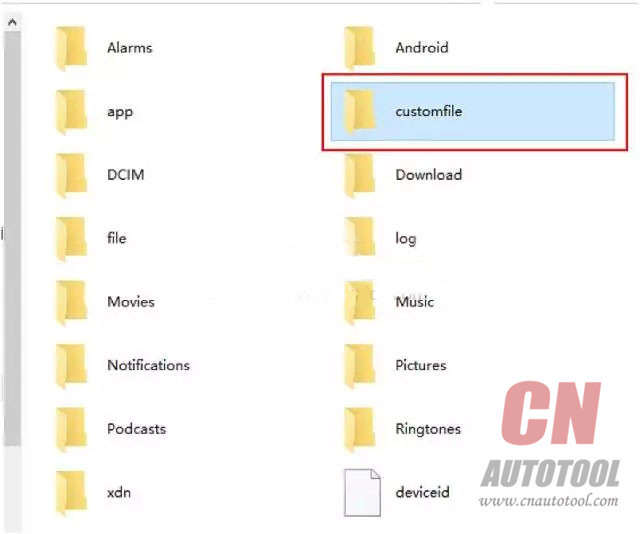
2) After you read out the data, please provide your seller/ engineer with  the 2 copies of data and K518ISE serial number, then wait for them to transfer it into special data. After you obtain the data, plug Obd2 Key Programmer K518ISE to the computer and put the special data into the “customfile” folder for programming.
21-5
3)  Add key on Volvo S40
Key: to add key, please input the new key’s remote ID and remote code (choose 16bit/24bit).
Note: There are 2 types of key (P/L), please confirm the new key’ style and packaging are the 100% same as that of the old key.
Smart key: just follow the instruction.
Key:
1) delete the key: before deleting the key, please firstly choose “Identify key ID” and record the ID info. During this process,  “The selected key ID will be deleted”.
2) Please be sure to keep the new key box where printed the remote info that you will need to enter when adding key.
3) If the car has no KVM box (under the driver seat) it has a normal key, not remote.
4) During the key programming, you need to enter the remote ID and remote code (select 16 digits or 24digits).
Note: There are 2 types of key (P/L), please confirm the new key’ style and packaging are the 100% same as that of the old key.
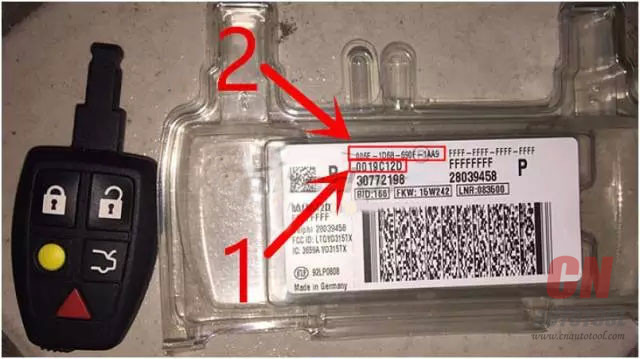
P style:
The remote ID is 8 digits (No. 1 shown as below)
21-6
The remote code is 16 digits (NO.2 shown as below)
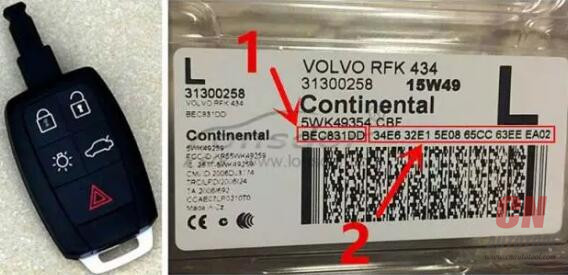
L-RFK style:
The remote ID is 8 digits (No. 1 shown as below)
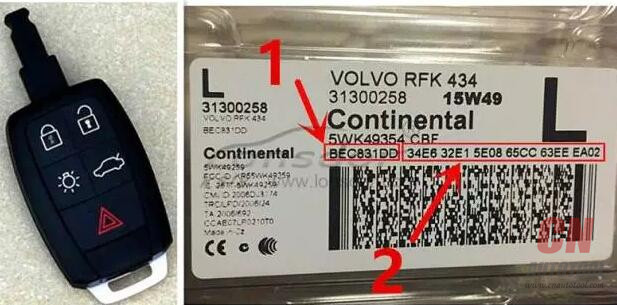
21-7
The remote code is 16 digits (NO.2 shown as below)
21-8
Smart key:
1) Unlock: only unlock the key that K518ISE from www.cnautotool.com is working with or the key with CEM security data.
2) Delete the key that is programmed, after that the original key could be programmed again in the same car but if unlocked it won’t be used on another car.
3) S40 smart key programming needs no dismantling and reading KVM.
21-9
How to identify smart key and semi-smart key?
1) Smart key: comes with a coil, marked with “PK” on the packaging and no remote code (see the left picture below)
2) Semi-smart key: No coil, marked with “RFK” on the packaging and has remote code of 16 / 24 digits (see the right picture below)
21-10
How to identify if the car has smart key or semi-smart key?
1) If you can find a KVM box under the driver’s seat, it is a smart key, otherwise, it is semi-smart key.
2) The key handle is a plastic model key while the semi-smart key doesn’t have that.
Chip: 48 chip
21-11
21-12
Remote style: normal remote frequency: 433MHz; smart remote frequency: 433MHz
Key fob: Dedicated small key No. 24/38
Password requirement: dismantle and read CEM, backup security data, then program.
Remote generation:
Normal key: during key programming, you need to enter the remote ID and remote code, after the key is programmed successfully, then remote is generated.
Smart key: after the remote card is programmed successfully, the remote will be generated automatically.
OBD position: on the bottom left of steering wheel.
21-13
Other information
1) car model
2) Key:
during the key programming, you need to input the remote ID and remote code (16 digits or 24digits).
There are 2 types of key (P/L), please confirm the new key’ style and packaging are the 100% same as that of the old key.
P style:
The remote ID is 8 digits (No. 1 shown as below)
The remote code is 16 digits (NO.2 shown as below)
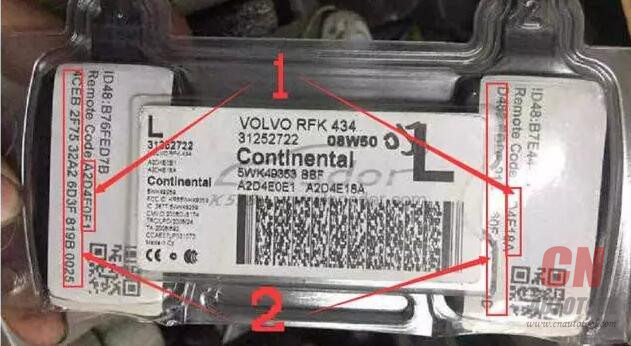
21-15
L-RFK style:
The remote ID is 8 digits (No. 1 shown as below)
21-16
The remote code is 16 digits (NO.2 shown as below)
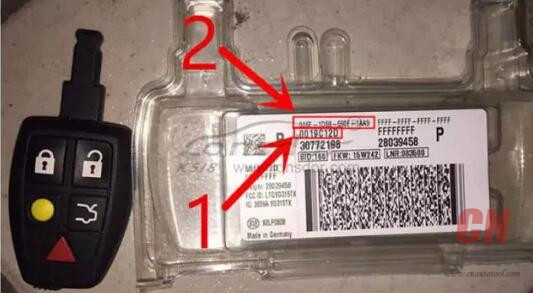
21-17
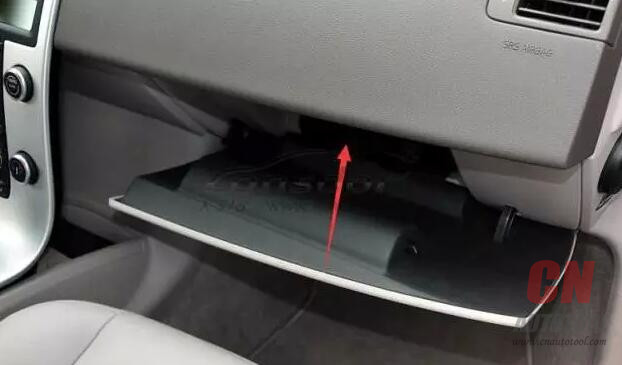
3) CEM box position (shown as below)
21-19
4) Smart key:
You are advised to refer to the original key to select the new key. For example, the L-PK-434 key below is a remote key, which doesn’t have remote code of 16/24 digits.
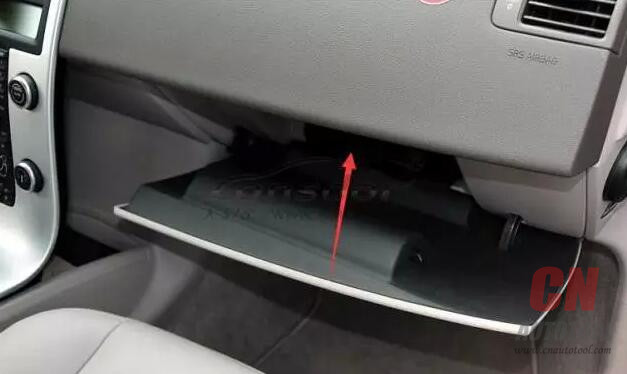
21-18
http://obd2scantool.net/2018/02/26/lonsdor-k518ise-program-volvo-s40-smart-key/

cnobd2tool 發表在 痞客邦 留言(0) 人氣()


Note:
The contents of this chapter apply only to Dealer Coordinators. Contact your Dealer Coordinator for information on licensing your OBD Scanner.
28-1
Accessing
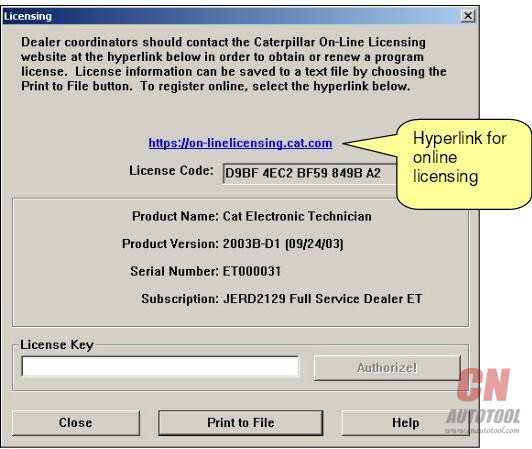
The Licensing dialog box allows you to register your service tool, or change your subscription type.
There are three different opportunities to license your service tool:
During installation of the service tool
Running the service tool without an active license
Selecting “License” from the Utilities drop-down menu in the service tool program
During installation of the service tool:
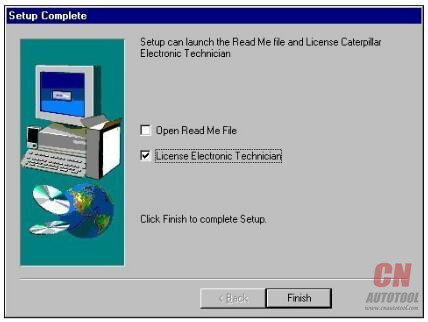
Step 1:  During installation of Caterpillar Electronic Technician, the Setup Complete dialog box is displayed
28-2
Step 2 Select the License Electronic Technician check box.Press “Finish.” The Licensing dialog box is displayed
Running the service tool without an active license:
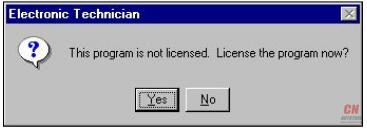
Step 1 When you launch Caterpillar Electronic Technician and have not licensed it yet, a message box displays asking if you want to license the program now
28-3
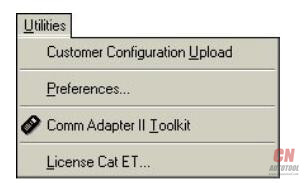
Step 2 Press the “Yes” pushbutton to license the service tool. The Licensing dialog box is displayed. Selecting License Cat ET… from the Utilities drop-down menu: In the service tool main screen, select “License Cat ET…” from the Utilities menu
28-4
Notice
Once your service tool is registered, write down the Serial Number and keep it in a safe place. You will need this number to transfer or re-license the service tool.
Licensing Caterpillar Electronic Technician
To license Caterpillar Electronic Technician online:
Step 1    Select the hyperlink in the Licensing dialog box. Your Internet browser displays the Corporate Web Security page.
Step 2    Enter your CWS Logon ID and Password in the text boxes.
Note: If you do not have a CWS Logon ID, you cannot use this option.
Step 3    Press the “Login” pushbutton. The Service Systems Software Online Licensing screen displays.
Step 4    Press the “License” pushbutton in the center of the screen. A series of screens will guide you through the licensing procedure.
Perform these three steps to license Caterpillar Electronic Technician by FAX or email:
Step 1
In the Licensing dialog box press the “Print to File” pushbutton. The File Save As dialog box is displayed. Select a location to save this license.txt file.
Step 2
Open the “license.txt” file. The CAT Electronic Technician License Request form is displayed
. Fill out this form as directed and email or FAX the information to Caterpillar Media and Product Information Logistics.
These mailing instructions are also included on the license.txt form. By default, this file is located in the service tool program folder.
Step 3
Press the “Close” pushbutton in the Licensing dialog box.
Step 4
When you receive the email or FAX from Caterpillar Media and Product Information Logistics, open the Licensing dialog box from the service tool.
Step 5
Enter the License Key in the text box exactly as it displays in the email or FAX.
Step 6
Press the “Authorize!” pushbutton. The “License granted” message box is displayed. Press “OK.”
 
http://www.freewebsite-service.com/cnautotool/Blog.php?id=1137760&snavn=Installing+Caterpillar+Electronic+Technician

cnobd2tool 發表在 痞客邦 留言(0) 人氣()


27-1
Autel Scan Tool has been known for stealing other peoples technology and information. They have been accused many times. This isn’t the first time. I meen come on harbor freight sells their product now. So i think they are getting desperate to hock their product through harbor freight.
The Autel represents part of the problem this country has. They steal the info, slap it in a tool, and sit back and collect the money, while a legit company pays for the info and then has to charge for it. We will buy the cheapest, reverse engineered crap out there, so I can save a few bucks. Then we cry about American jobs going overseas, etc, etc.
Buying that crap is no different in my eyes then going to an unlicensed repair shop, so I can save the money over a legit business that pays taxes, employees people, and will be there when you have a problem.
The autel has alot of pirated info and technology thats why its a little more capable. But whats gonna happen in 2 years when autel is belly up and ur stuck with a broken scanner. Snap-on pays for their info and their technology is legit. Honestly its a better product. Still your purchase and your money so. Take our sugestions and info and do what u will with it.
I have used the maxisys and the solus. I really like the Autel MaxiSYS, as far as the layout, menus, ect. The wireless adaptor is also very handy. Between the solus and the autel I use the autel when I have a choice. I hadn’t heard anything about that Ford suit until this thread started. One thing about the autel: in my experience, it doesn’t function well with Hyundai and Kia cars. They may have done some software updates to improve that, but the last time I tried it would only do generic obd2 on them. Something to consider if you see many Korean cars in your neck of the woods
I know the Snap On reps are constantly talking about this, and most likely they are misinformed, exaggerating, or both. The Autel MaxiSYS Elite is about the only scanner (IMO) that can seriously compete with the Verus. The MaxiSys is 100% faster the Verus, way easier to navigate, and a third the price
http://obd2autotool.inube.com/blog/7505491/autel-maxisys-elite-is-worth-buying/

cnobd2tool 發表在 痞客邦 留言(0) 人氣()


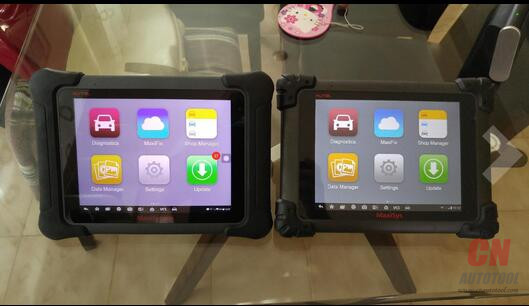
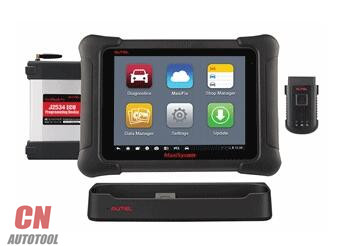
Autel’s most complete diagnostic tool for cars sold in the USA is the MaxiSys Elite. This model replaced the Autel MS908P about a year ago.   Amazon, eBay and other websites are selling the same model for about $50 more that Best Value Company.   Although we collect sales tax on sales made to California customers, CnAutotool will collect sales tax to all customers in states where sales tax is applicable.
19-1
The Autel Elite features a charging cradle (sometimes called a charger or docking station).   The Autel OBD2 is wireless via Bluetooth.   The tablet uses a standard Android operating system so you are able to watch YouTube videos or browse the web.
The unit is not listed on our site, but we stock it and sell it.
It includes a 2-year subscription and warranty, high resolution screen, docking station, J2534 box, and is supported by Autel US. Since 2009, AESwave has been an authorized reseller for Autel North America.
Plus, we let you choose which VCI to include:
– the Mini VCI
– the large VCI with 4-ft cable
Also, at no extra charge, AESwave includes the two cables required to flash BMW F-chassis:
– the BMW Ethernet cable
– and an Ethernet to USB Adapter cable
Click here for more information about our Original Autel MaxiSYS Elite

cnobd2tool 發表在 痞客邦 留言(0) 人氣()


Just ordered a Chinese clone Chrysler Micropod II (the SP271-C) and it has been working exactly like an OEM unit.
The provided software is the same as the Chrysler OEM software (verified with file size and md5 hash). This version must communicate to the witech server to verify valid serial number.
I don’t have experience with Windows XP. But this version of Witech works fine on Windows 7 and Windows 10.  (I did try an android ap called chrysler pin pull off google store that promised to get the pin via obd2 dongle but I couldn’t get it to work on mine but may work for others)
No errors so far and tested functions on 3 different vehicles. It has been confirmed working with unmodified software Chrysler wiTech MicroPod 2 (downloaded directly from Chrysler) and online (logged into TechAuthority). Not sure if it will be blacklisted or the firmware will be updateable with the next software release, but for now it works fine.
One vehicle i tested with: a 2014 dodge avenger …. just fine.
was able to flash a module update and program a new key with the unit.
try the emulator on: DRB III emulator confirmed working.
The witech micropod 2 on CnAutotool only works offline so non of the dealer facilities (no ecu updates/wiring diagrams/online manuals) but diagnostic tests and programing work fine
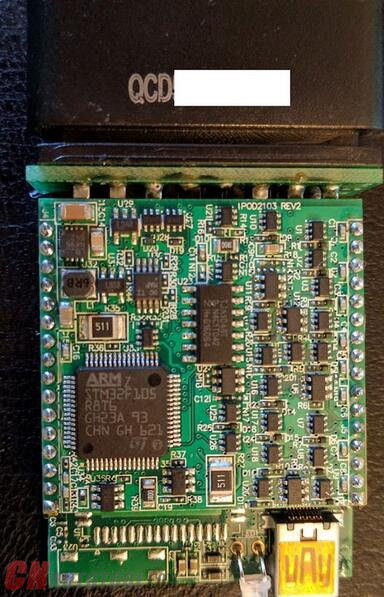
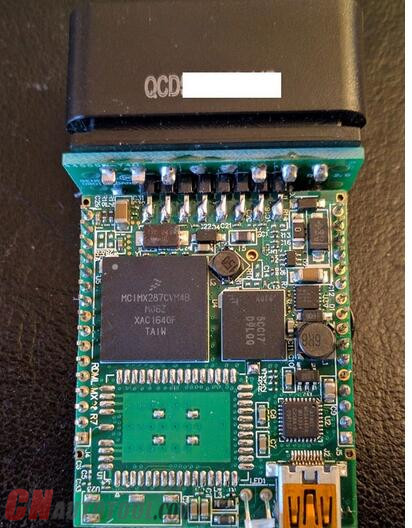
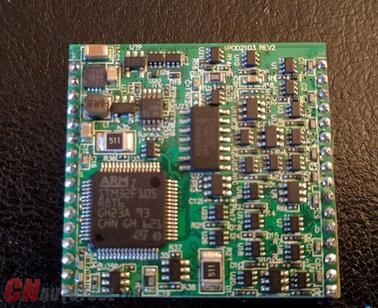
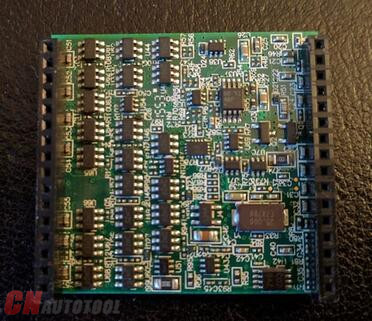
I have also uploaded pictures of the internals for those who are curious.
25-125-2 25-3 25-4 25-5
http://www.whynotad.com/ad/cars-vans-motorbikes/how-to-set-up-witech-micropod-2-with-drb-iii-emulation/692387

cnobd2tool 發表在 痞客邦 留言(0) 人氣()

16-1
The purpose of the TPMS in vehicles is to warn drivers that at least one or more tires are significantly under-inflated, possibly creating unsafe driving conditions.
In low tire pressure condition, The Autel Scanner TPMS indicator is a yellow symbol like this:

cnobd2tool 發表在 痞客邦 留言(0) 人氣()


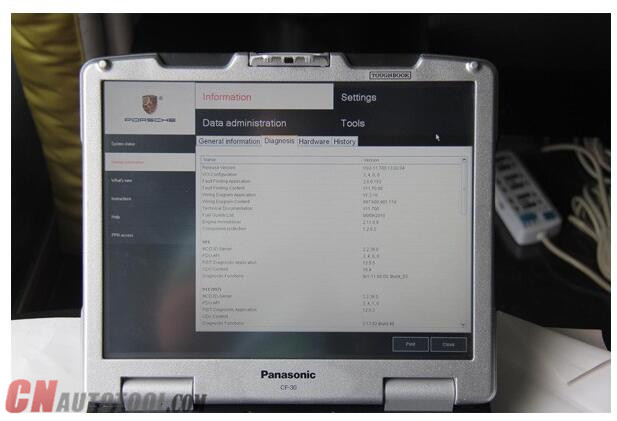
The Porsche Diagnostic Tool piwis tester ii work with the old and latest porsche car. It is equiped with the panasonic laptop and original software for the test.
Functions:
Read/clear error code, catch data stream, computer programming match, component test,maintenance information consult, components site drawing, wiring diagram.
The piwis tester ii work with the old and latest porsche car. It is equiped with the panasonic laptop and original software for the test. Porsche piwis tester II can help you diagnose and programme the most new and old kind of porsche cars. For example: 911(997), Boxster/ Cayman,(987), Cayenne up to MY 2010, Cayenne from MY 2011 and Panamera from CnAutotool.
The new Panamera can only be diagnosed by using this Porsche PIWIS Tester-II. Based on current project planning, all earlier vehicle models will gradually be changed over to the new PIWIS Tester-II by the end of 2010. PIWIS Tester-I must be used for older models in the Porsche workshop until end of 2010.
Support for PIWIS Tester-I will no longer be available once the earlier diagnostic programs have been transferred to PIWIS Tester-II.
When the PIWIS Tester-II is distributed, it will contain one basic piece of software. This is necessary in order to start and configure the tester.
Porsche Piwis Tester II Support Systems:
25-1
ENGINE automatio transmission, air-conditioner, SRS, ABS, ASR, MPL, GM, Original antitheft System,KEYLESS GO system, OBDII system.
Porsche Piwis Tester II Vehicle Coverage:
1. 911(997) (991)
2. Boxster/Cayman (987)
3. Cayenne up to MY 2010
4. Cayenne from MY 2011
5. Panamera
Porsche Piwis Tester II Packing List:
1. Piwis Tester II VCI * 1 PCs
2. OBDII Cable *2 PCs
3. USB Cable * 2 PCs
4. Extensional Cable *2 PCs
5. Used PANASONIC CF30
Porsche Piwis Tester II after Sales Service:
1. One year free maintenance
2. One year free updating
3. Long-term technical support
Update: by CD or HDD, one year for free, can not update online. 200usd for one time after one year.
Q: How to accomplish Porsche Piwis Tester II online function?
A: Porsche Piwis Tester II online is via Team Viewer remote control, globally available.
Q: How to handle with 90 days locking about Porsche Piwis Tester II?
A: Porsche Piwis Tester II timing is unlimited, always showing 90 days.
Q: How much software update charges for per year?
A: The first year software update fee is free.
Q: How to update ?
A: By CD or HDD .
Q: What is the current software version for Porsche Piwis Tester II?
A: Version 11.7 Covers Porsche’s vehicle lists to the whole year of 2013’s.
Q: If License area showing China or CN?
A: The License Area does not show China or CN.
Q: If there is manual available?
A: Yes. Provide electronic English manual for free. Please e-mail us to obtain it.
Q: If it is showing Porsche Logo when booting computer?
A: Yes, CF-31R, CF30K are with Porsche Logo when booting computer.
Q: What languages are available for   automotive scan tool  Porsche Piwis Tester II?
A: Language availability: German, British English, American English, French, Italian, Spanish,Japanese, Chinese, Russian, Portuguese, and Dutch.
Q: License Validity?
A: To support ONLINE function, valid certificate must be available for Porsche Piwis Tester II.
Requires ONLINE modules: (F BCM R BCM DME ELV SRS KEY)
Languages:
English
Francais
Italiano
Espanol
日本语
中文
Pyccknn
NOTICE:
Software will never expire!!
 
http://blogs.rediff.com/obdautotool/2018/01/02/piwis-2-porsche-piwis-tester-ii-feedback-notification/
 
25-2
http://blogs.rediff.com/obdautotool/2018/01/02/piwis-2-porsche-piwis-tester-ii-feedback-notification/

cnobd2tool 發表在 痞客邦 留言(0) 人氣()

16-1
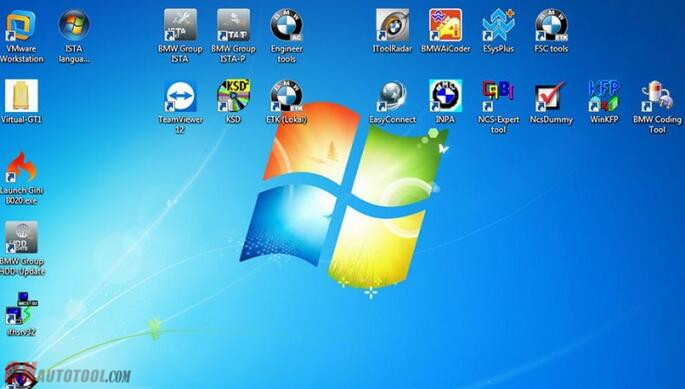
Free download 11.2017 BMW ICOM diagnostic software ISTA-D 4.08.12 ISTA-P 3.63.0.400 on Mega with questions and answers frequently asked.
Download:

cnobd2tool 發表在 痞客邦 留言(0) 人氣()


Your car has been producing this kind of rattling sound for a long time, yet you can’t remember the exact time when it starts. Knowing the causes of these common car noises and getting them fixed sometimes can save you a lot of trouble and also much cost.
What is that rattling? Is it serious? We all can get a little paranoid about a new sound our car is making. Those sounds can certainly be annoying, but what people don’t realize is sometimes those sounds may be linked to something more serious.
About 7 percent of car crashes are caused by some kind of vehicle failure, with tire degradation and brake system failures topping the Auto ECU Programmer, according to the National Motor Vehicle Crash Causation Survey from the National Highway Traffic Safety Administration. But tire and brake failure aren’t the only types of vehicle problems that can lead to accidents – engine, steering system and suspension failures also cause crashes.
“Getting your oil changed, tires rotated and brake pads checked regularly not only helps keep your car running smoothly, but it also helps keep you and your family safe,” says Matt Myers, senior vice president of claims with Erie Insurance. “It’s also important to check your car’s transmission fluids and get the 50,000-mile and 100,000-mile checks. It might sound like a lot, but regular preventative maintenance is the best way to keep those strange car noises – and accidents – to a minimum.”
Here are six common car noises people hear and what they could mean:
Humming or Groaning
When you hear humming while driving at faster speeds, it’s a sign there probably is some wear on your tires, which can lead to serious issues. It could be located on the insides of your tires, which is hard to diagnose on your own, but not having it checked is a risk, because the steel belts in the tire might be coming apart.
Growling
This noise could change or even go away when you turn the diagnostic tools, but it is usually caused by a defective front wheel bearing. The change in noise could be a result of the shift in the weight of the car as you turn.
Whining and Creaking
You might hear these noises backing up or turning. It could be the result of a ball joint or tie rod seizing up.
Squeaking
This can be a high-pitched, steady annoyance that lets you know it’s time to get your brake pads checked or replaced.
Grinding
This sound means two pieces of metal are touching when they shouldn’t be. This sound could be a multitude of things: brakes, powertrain, suspension or something else. Whatever the case, a grinding sound means you need to get your car checked out as soon as possible.
Hissing
A hissing sound might occur after you turn off your ignition and can sometimes be followed by smoke from under your hood.
The next time you hear strange noises coming from your Professional Diagnostic Tools, don’t just turn up the radio to drown them out – get them checked by a mechanic. Ignoring those noises today could lead to a dangerous and expensive situation tomorrow.
http://obdauto.no.comunidades.net/what-is-the-best-obd-tool-for-the-car

cnobd2tool 發表在 痞客邦 留言(0) 人氣()

Blog Stats
⚠️

成人內容提醒

本部落格內容僅限年滿十八歲者瀏覽。
若您未滿十八歲,請立即離開。

已滿十八歲者,亦請勿將內容提供給未成年人士。